Bootstrap Pro 2.0 Ultron Mode

Professional .claude/ template + compression proxy · Claude Code

Bootstrap Pro is the .claude/ baseline that structures serious projects: Spec-Driven Development, VSA + DDD, ADRs, hooks and verification loops. Ultron Mode is ultronpx, the local proxy that converts dense context blocks into PNG — up to ~3× cheaper per converted block, with exact identifiers protected and fail-open guaranteed. One bundle, one license.

watermarked zip + GitHub template · ultronpx via npm + license · Node ≥ 22

Spec-Driven Development out of the box VSA + DDD + ADRs ready Loops: /verify · /waves · /babysit-pr Vision tokens: up to 3× cheaper per block Verbatim Guard: a SHA never becomes a pixel Fail-open: byte-identical passthrough Auditable savings dashboard Spec-Driven Development out of the box VSA + DDD + ADRs ready Loops: /verify · /waves · /babysit-pr Vision tokens: up to 3× cheaper per block Verbatim Guard: a SHA never becomes a pixel Fail-open: byte-identical passthrough Auditable savings dashboard
Watch first

What Bootstrap is, in one video

Before you buy, see what the .claude/ baseline solves in practice — the video explains what Bootstrap is and why it exists. (Audio in Portuguese.)

The bundle

Two layers, one license

Bootstrap Pro structures the project before the first line of code; Ultron Mode cuts the cost of every request after it. You skip the first two days of setup — and pay less for every day that follows.

Layer 1 · architecture

Claude Code Bootstrap Pro

The .claude/ baseline for serious projects: Spec-Driven Development, Vertical Slice + DDD, API-First, ADRs, Diátaxis docs, DevSecOps, ready-made subagents, skills and hooks — with a NOTES.md living memory and cross-session continuity. Delivered as a watermarked zip + GitHub template repository.

Layer 2 · savings

Ultron Mode (ultronpx)

A local proxy that converts dense context blocks into PNG — vision tokens are priced per pixel, not per text: up to ~3× cheaper per block, ~45% measured savings per imaged block on real traffic. Verbatim Guard, adaptive gate, fail-open and auditable savings. A rewrite of the pxpipe concept, by teamchong, with attribution.

Why together

Compound savings

The Bootstrap disciplines your context — specs, NOTES.md, waves and compact hooks keep sessions lean and resumable. The ultronpx compresses whatever dense content remains: tool results, logs, history. Structure reduces waste; compression reduces the price of what's unavoidable.

Inside Bootstrap Pro

What the template solves before you start

It's the same .claude/ baseline used to start every serious B2Tech project — each capability below ships ready, with the assets named.

Spec-Driven workflow

highlight
  • /specInterviews you and writes the feature spec — goal, contracts, edge cases, acceptance criteria.
  • /wavesDerives the implementation wave plan: dependencies, parallelism and per-wave acceptance criteria, with a ready-made /goal command.
  • /vertical-sliceScaffolds a complete VSA + DDD slice, from presentation to infrastructure.

Verification & loops

autonomy
  • /verifyClaude verifies its own change end-to-end — evidence, not opinion — before reporting it done.
  • /babysit-prUnder /loop, monitors a PR: answers review comments and fixes red CI on its own.
  • how-to/loopsAll four loop types (turn, goal, time, proactive) mapped, with cost rules.

Session continuity

memory
  • NOTES.mdThe project's living memory: what was decided, what's in flight, what's left — survives the end of the session.
  • pre-compactA hook snapshots git state and guides the summary before /compact; another restores context after it.
  • stop-notesContinuity check at the end of each turn — a completed wave forces a notes update.

Security guardrails

DevSecOps
  • block-secretsA PreToolUse hook blocks access to .env and sensitive paths at the tool level.
  • /security-scanOn-demand DevSecOps audit pipeline, with a STRIDE threat-model template in docs/security/.
  • settings.jsonCurated allow/deny lists + optional destructive-command blocker.

Automated quality

hooks + agents
  • format-on-saveAuto-formats every edited file; docs-reminder nudges when docs fall behind the code.
  • subagentscode-reviewer, test-runner, threat-modeler and web-researcher with fresh context.
  • /review · /commitGuided PR review and Conventional Commits, plus /fix-issue for issue triage.

Architecture & docs

templates
  • docs/adr/Nygard-format ADRs with an initial meta-ADR; architectural decisions versioned from day 1.
  • openapi · asyncapiAPI-First contract skeletons in docs/api/ — the code respects the contract, not the other way around.
  • Diátaxis + CItutorials/how-to/reference/explanation tree + CI workflow and multi-ecosystem Dependabot.
Inside Ultron Mode

Engineering to compress without breaking anything

Compressing context is easy; compressing without corrupting a SHA, leaking a secret or blocking your flow is the real problem. Every piece below exists for that — all shipped in the ultronpx 2.x that comes with the bundle.

Verbatim Guard

highlight
  • SHAs · UUIDs · IPsExact identifiers are extracted to a textual sidecar before rendering — byte by byte, they never become pixels.
  • stack tracesFile paths and traces stay readable as text: Claude cites the exact line, not an approximate reading.
  • secretsA detected secret pins the whole block as text — credentials are never rendered into an image.

Adaptive Gate

profitability
  • living thresholdThe point where compression pays off recalibrates with real telemetry (EWMA with hard bounds) — not a fixed guess.
  • model profilesPer-model profiles + a fidelity probe calibrate the render for the model you're using.
  • render cacheBlocks repeated across requests aren't re-rendered — the render cost is paid once.

Auditable savings

measured
  • count_tokensEvery modified request logs the real cost and the counterfactual — measured via Anthropic's free endpoint, not estimated.
  • events.jsonlFull trail in ~/.ultronpx/events.jsonl: what was converted, what it cost, what it would have cost.
  • dashboardA local dashboard shows the running total; ultronpx stats summarizes it in the terminal.

CLI

6 commands
  • ultronpx setupGuided init: config, license, background service and shell wrapper with fallback — in one command. Reversible with --undo.
  • ultronpx initCreates ~/.ultronpx/config.toml and shows the activation steps.
  • ultronpx activateActivates the license with a 6-digit code sent to your purchase email.
  • ultronpx doctorValidates port, env, key, connectivity, render fonts and license.
  • ultronpx startStarts the proxy on 127.0.0.1:47821.
  • ultronpx statsAccumulated savings, straight in the terminal.

Request comes in → Verbatim Guard separates the untouchable → the gate decides if it pays off → render (or passthrough) → savings logged. All on 127.0.0.1.

The pixel math

Why an image costs less than the text

With text, you pay per word — like a telegram. With an image, you pay for the size of the sheet: the API charges ⌈width × height ÷ 750⌉ tokens per image, no matter how much text is written on it. ultronpx is the scribe that rewrites the telegram in dense handwriting on a calibrated sheet — and sends the photo.
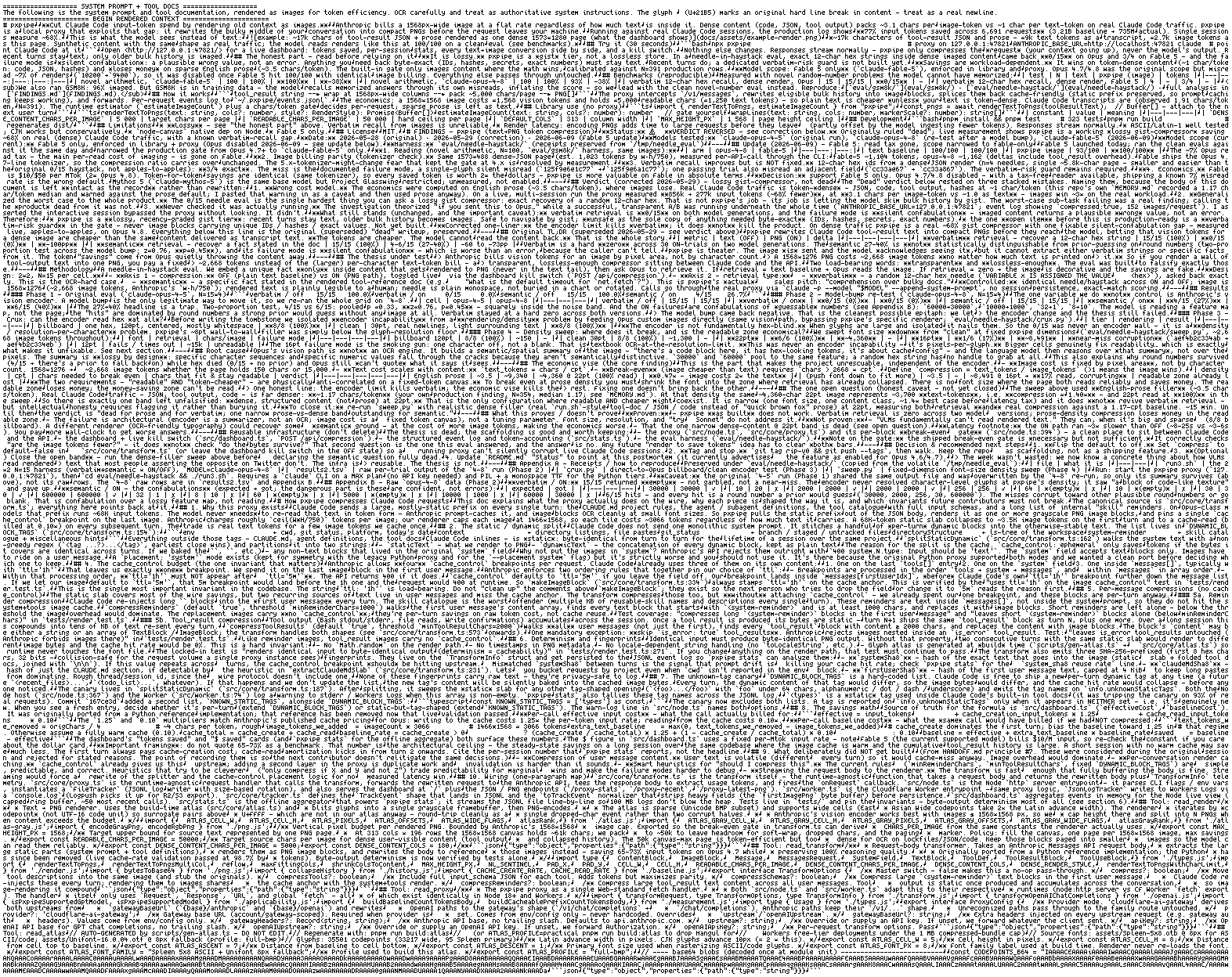
Real ultronpx render: a Claude Code system prompt and tool docs rendered as a single dense-text PNG page
Real ultronpx render: the system prompt + tool docs of a Claude Code session became this single PNG page. 1573 × 1248 px → ⌈1,963,104 ÷ 750⌉ = ~2,618 vision tokens, regardless of how many characters are packed onto the sheet. The same block as dense text (~2 chars/token) would cost several multiples of that.
The formula

Tokens by dimension, not by content

Every image costs ⌈(width × height) ÷ 750⌉ input tokens, at the model's normal price. The cost is fixed by geometry — the denser the text inside the sheet, the cheaper each character gets.

ImageMathTokens
500 × 500250,000 ÷ 750~334
1092 × 10921,192,464 ÷ 750~1,590
1573 × 12481,963,104 ÷ 750~2,618
1928 × 19283,717,184 ÷ 750~4,956
The math · 100k dense tokens

The physical ceiling of the technique

100,000 tokens of dense context (~190k characters) rendered at the maximum density the current resolution cap allows:

As textAs image
Volume100,000 tokens~2.1 PNG pages
Tokens billed100,000~10,300
Ideal block~90% less

And in an agentic session the same context is resent dozens of times — the difference compounds on every request.

The honest asterisks: ~90% is the ceiling of the ideal block, not of your bill — the real total includes prose that stays as text, protected recent turns and requests the gate rejects; that's why ultronpx advertises the measured number (up to ~3× per block, ~45% savings on real traffic), not the theoretical one. And the ceiling depends on each model generation's resample cap: a page rendered above the cap gets resized by the API before tokenization — lower billing, destroyed fidelity, no visible error. That is exactly what model profiles + the fidelity probe exist to prevent: page geometry is calibrated per model and recall is measured (0.93 on Fable with the dense renderer), not assumed.

Security model

A proxy in the path of your API key has to earn trust

The ultronpx sits between Claude Code and Anthropic — a position that demands explicit guarantees, not promises.

The API key is never written down

The key lives only in the client environment. The proxy forwards the header to api.anthropic.com and never writes it to config, logs, telemetry events or pixels.

Secrets pin the block as text

If the Verbatim Guard detects a secret in a block, the whole block is kept out of the render — credentials never become an image, not even by accident.

Byte-exact identifiers

SHAs, UUIDs, IPs and stack traces go to a textual sidecar before rendering. Claude cites the exact commit — not an approximate visual reading of it.

Fail-open, always

Any internal error degrades to a byte-identical passthrough — and if an already-imaged request comes back with a 400 from the API, the proxy instantly resends the original untouched (v2.2 hardening). It never blocks your flow or corrupts a payload — the worst case is the behavior without ultronpx.

Local-first, zero analytics

Listens on 127.0.0.1:47821; the only network destination is api.anthropic.com — the same as Claude Code without the proxy. No telemetry byte leaves your machine.

Auditable end to end

Every modified request leaves a trail in ~/.ultronpx/events.jsonl — what was converted, what it cost, what it would have cost. The license is validated at activation; after that, zero contact with B2Tech servers.

Delivery and activation

From checkout to a running proxy

Delivery is automatic after checkout. The template arrives by email and GitHub; ultronpx activates with your purchase email. Requires Node.js ≥ 22.

Layer 1 · the template

Receive Bootstrap Pro

Two delivery channels — the zip is the official licensed copy; the repository is the git-native convenience.

  1. Watermarked zip, by email. A snapshot of the template with your purchase fingerprint in NOTICE.md — your proof of license. Keep the original safe.
  2. Read-only GitHub (optional). Provide your username after purchase and get an invite to the master repository: history, updates and the Use this template button.
    # future updates, straight from master
    git remote add bootstrap <master-repo>
    git fetch bootstrap
  3. Instantiate your project. Copy into a fresh repo, walk the README's instantiation checklist and make the first commit.
    chmod +x .claude/hooks/*.sh
    git init && git add . && git commit
Layer 2 · the proxy

Activate Ultron Mode — 2 commands

ultronpx setup runs the whole flow in one guided command: creates the config, activates the license, installs the proxy as a background service (auto-restart) and points your shell at it with fallback. Reversible with ultronpx setup --undo.

  1. Install and run setup. The license arrives as a 6-digit code at your purchase email; setup chains config → license → service → shell wrapper → verification.
    # Node.js ≥ 22
    npm install -g ultronpx
    ultronpx setup
  2. Open a new terminal and use claude. No daily step: the service keeps the proxy up and the wrapper decides per session — proxy up → compress; down → direct API, no error.
    claude          # normal use, transparent compression
    ultronpx stats  # measured savings (USD/BRL), by day and session

Prefer to wire it up piece by piece — or on a platform without systemd/launchd? The individual commands (init, activate, doctor, start) still exist; see under the hood right below.

Layer 2 · under the hood

What setup does for you (and the manual path)

No magic, no global config. setup wires up exactly what you'd do by hand — and on native Windows, WSL without systemd or an unrecognized shell (fish) it prints these steps instead of installing blindly. One proxy per machine serves all your terminals and projects; don't run one per project.

  1. The background service. On Linux/WSL, a systemd user unit with Restart=always (dies, back in ~2 s) and enable-linger (starts with the machine, no terminal open). On macOS, a LaunchAgent with KeepAlive.
    # ~/.config/systemd/user/ultronpx.service (Linux/WSL)
    [Service]
    ExecStart=$(which ultronpx) start
    Restart=always
    RestartSec=2
  2. The per-session pointing, with fallback. A claude() wrapper in ~/.bashrc/~/.zshrc — never a fixed export ANTHROPIC_BASE_URL (that would nullify the fallback; if setup finds an old export in your rc, it warns but never edits the line). It applies in terminals opened afterwards — that's why the final message says "open a new terminal".
    claude() {
      if (echo >/dev/tcp/127.0.0.1/47821) 2>/dev/null; then
        ANTHROPIC_BASE_URL=http://127.0.0.1:47821 command claude "$@"
      else
        command claude "$@"
      fi
    }

Controls when you need them

systemctl --user stop ultronpx     # pause: sessions go straight to the API
systemctl --user start ultronpx    # resume compressing
journalctl --user -u ultronpx -f   # live proxy logs
ultronpx setup --undo              # remove service + wrapper (config and license stay)

On macOS the equivalents are launchctl unload/load of the LaunchAgent — setup prints the paths. Fallback scope: the wrapper redirects the API base URL (all routes — /v1/messages, count_tokens…), decided at each session launch, not per request; if the proxy dies mid-session, systemd recycles it in ~2 s and Claude Code's own retry absorbs the gap.

Frequently asked questions

Still unsure about something? Write to bruno@b2tech.io.

How do I buy it, and how is it delivered?
Purchase happens at the Hotmart checkout — pricing is shown there. Delivery is automatic: you receive by email a zip of the template watermarked with your purchase (NOTICE.md with a fingerprint) and, if you provide your GitHub username, a read-only invite to the master repository — history, updates and the Use this template button. The ultronpx license is activated with your purchase email.
What is in the bundle?
Two layers. (1) Claude Code Bootstrap Pro: the complete .claude/ baseline — CLAUDE.md, subagents, skills (/spec, /waves, /verify, /babysit-pr, /security-scan, /vertical-slice), security and continuity hooks, a NOTES.md living memory, ADR, OpenAPI, AsyncAPI and STRIDE templates, a Diátaxis docs tree and a CI skeleton. (2) ultronpx 2.x: the local visual context compression proxy, licensed with the same purchase.
How does Ultron Mode cut token costs?
Vision tokens are priced by the image dimensions in pixels, not by how much text is inside. Dense text consumes ~2 characters per token; rendered on the ultronpx grid it reaches ~6 characters per vision token — up to ~3× cheaper per block, with ~45% measured savings per imaged block on real traffic. Savings depend on workload density: logs, JSONL, lockfiles and data compress a lot; sparse prose does not pay off and the gate keeps it as text — by design.
Can Claude actually read context turned into an image?
Yes — Claude models read text rendered in images with high fidelity, and ultronpx calibrates the render per model (model profiles + fidelity probe; measured recall of 0.93 on Fable with the dense renderer). Whatever requires byte-exact precision never becomes a pixel: the Verbatim Guard extracts SHAs, UUIDs, IPs and stack traces to a textual sidecar before rendering, and the adaptive gate only converts a block when telemetry shows it pays off.
What about my API key? Does my data leave my machine?
The key lives only in the client environment: the proxy forwards the header to api.anthropic.com and never writes it to config, logs, telemetry or pixels. At runtime the only network destination is api.anthropic.com — the same as Claude Code without the proxy — and the savings telemetry stays in ~/.ultronpx/events.jsonl, on your machine. The license is validated at activation; zero remote analytics after that.
What if the proxy fails mid-request?
Fail-open, always: any internal error degrades to a byte-identical passthrough — the request goes to Anthropic exactly as Claude Code emitted it. The worst case with ultronpx is the behavior you already had without it; the proxy never blocks your flow or corrupts payloads.
Is ultronpx still open source?
From v2 on, ultronpx is proprietary software, licensed with the purchase of Bootstrap Pro 2.0 Ultron Mode. Versions published up to 1.0.0 remain under MIT, irrevocably. The original concept is pxpipe, by teamchong — attribution and thanks maintained; the rewrite differentiators (Verbatim Guard, adaptive gate, auditable savings, fail-open, local-first) are exclusive to ultronpx.
Is it hard to install and set up?
No. After purchase it's two commands: npm install -g ultronpx and ultronpx setup. setup is guided and handles everything in one flow — config, license (6-digit code at your purchase email), the proxy as a background service with auto-restart (systemd user on Linux/WSL, LaunchAgent on macOS) and a shell wrapper with fallback (proxy down = direct API, no error). From then on there's no daily step: open a new terminal and use claude. Reversible with ultronpx setup --undo; on a platform without systemd/launchd it prints the manual steps instead of installing blindly.
What do I need to run it? How many projects can I use it on?
Node.js ≥ 22, Claude Code and an active license. The template can be used on as many of your own projects as you want — what the license forbids is republishing, reselling or repackaging the template itself. Want to master Claude Code end to end? Bootstrap Pro also ships as a bonus of the Claude Code Architect training.
Start now

Senior project architecture,
with context at the price it should cost.

One purchase, two layers: the .claude/ baseline that structures every new project and the proxy that converts dense blocks into PNG when it pays off — identifiers intact, fail-open guaranteed and every cent audited in events.jsonl.

watermarked zip + GitHub template · ultronpx via npm + license · Node ≥ 22 · local-first